Re-centering pivots
Posted: Wed May 25, 2011 1:53 am
Have you ever adjusted the position of an object by rotating it? Or moving it to a vastly different location and then had your pivot not work/look correct?
Here is how you quickly reset the pivot to object and world relationship.
First, select the object that is having the issue in whatever viewport you have it visible in.
Select "Heirarchy" along top of menu rollouts
Then select the first button to "Affect Pivot Only"
Next select the "Center to Object" button
Now select "Align to World" button.
Finally, Un-select the "Affect Pivot Only" button back at the top.
Do NOT FORGET TO UNSELECT "Affect Pivot Only" or when you make any other changes, to just about any other object, you will be actually changing the pivot location instead of the object itself.
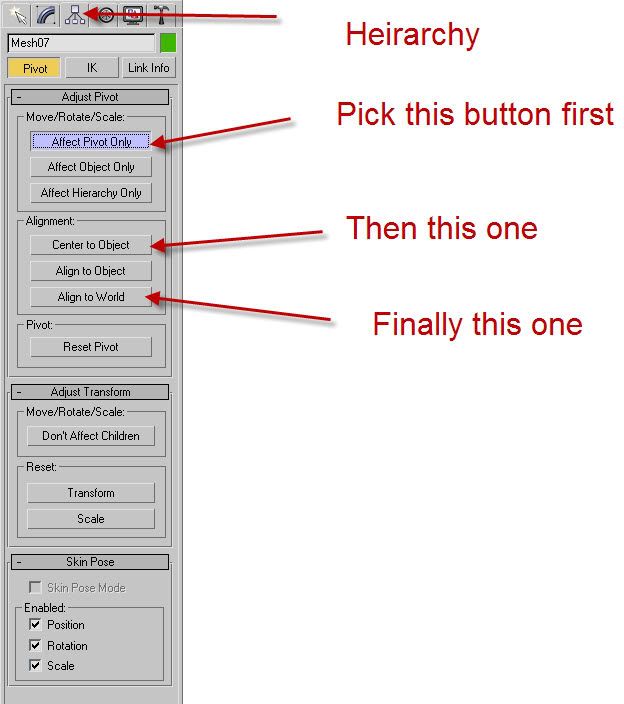
Here is how you quickly reset the pivot to object and world relationship.
First, select the object that is having the issue in whatever viewport you have it visible in.
Select "Heirarchy" along top of menu rollouts
Then select the first button to "Affect Pivot Only"
Next select the "Center to Object" button
Now select "Align to World" button.
Finally, Un-select the "Affect Pivot Only" button back at the top.
Do NOT FORGET TO UNSELECT "Affect Pivot Only" or when you make any other changes, to just about any other object, you will be actually changing the pivot location instead of the object itself.